Monday, November 29, 2010

Belkin TuneFM Ipod FM

Gh


Become a radio jokey with your Ipod and Belkin!

Today, I am going to talk about a very useful gadget. The discovery of this gizmo was out of necessity. I've a Fiat Linea emotions. The car came with a company fitted stereo
from Blaukpant. But it is not so great unlike the car

First, there are no pre amp out. Yes you read it right - no pre-amps. It simply means that I can't hook a woofer to it. The story does not end there. It doesn't have a USB socket nor an aux port to connect my Ipod to it. I tried my best, went pillar to stone, but there was nothing that could fix this Italian junk.

The only option left was FM. If my Ipod could radiate those sweet n cripsy FM waves, it would redeem me from those agonies. Belkin made me happy!

Belkin TuneFm is an amazing device. It can transmit music over the FM. It plugs straight into the Ipod. There is a console on top to select the frequencies in the FM band (88- 107 Mhz) There are 2 preset memories to store favourite frequencies. It draws power from the Ipod, but does not drain it significantly. I managed to run it for 7 hours on a single charge. If you drive that long, chances are, that you will drain faster than the ipod.

Performance it decent. Reception was fair when I kept it close to the set over the dashboard. It took some time before statics disappeared completely leaving only the "sound of music". There is an option to boost power in two steps before it turns into non stereo mode where it guzzles maximum power

It is intelligent too. When I stopped playing songs on the pod; It stopped radiating. No wonder it lasted so long. Range is also decent. I managed to latch it on my home theater from virtually every corner of the room. Now where ever I go, I carry my party DJ along with me

Price can be a put off specially as compared to bluetooth transmitter. It cost me a little over 40$. But looking back at my car, it worth every single penny to me. It also comes with a car charging kit for those long drives down to the country sides.

So check it out at the local computer store near you ASAP

Sunday, May 9, 2010

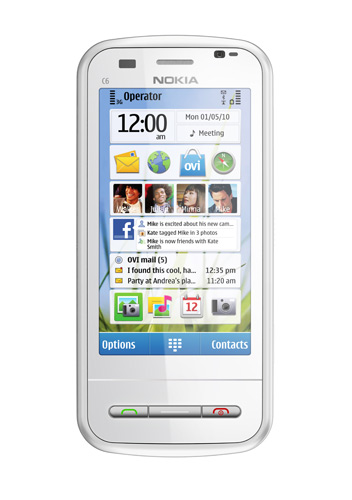
Nokia C6 - worth it !


When Apple announced the launch Iphone on Jan 9 2007, little did anyone know that it will change the psychy of mobile users in the generations to come. Touch screen became an instant hit. People felt their old phones were sluggish and orthodox like grandma. But Apple was not pioneering it. It never did with most of its product except MAC. There were already touch screen phones in the stable from O2 and Imate. These phones were expensive, bulky and based on slow and sulky Windows Mobile. They never caught the attention like Apple Iphone did. I too bought HTC touch soon after the Iphone was launched, only to abandon it a year later. Windows sucks !

Now there are plenty of them, and all types of them. The mother earth has suddenly woken up to touch, and to goad it further is Nokia C6. A symbian based phone, which draw its virtues from the biggie Nokia N97 - The disastrous N series from Nokia.

It has got everything you need and nothing you don't. It has 3.2" inch touch screen with an appreciative Qwerty keypad. The screen resolution is 640 x 360 (nHD) with resistive touch. It has adorns gizmos like brightness control, orientation control, proximity sensor and ambient light detector. It virtually copies everything it possibly could from the Iphone.

It works on both GSM (2G) and WCDMA (3G) networks, which is good given that the 3G launch in India is imminent. It also supports POP3 email clients and office stationerys like word, excel and pdfs. Its internal memory is 200 MB with external, hot swappable, micro SD card expandable to 16 GB. Talk time on GSM network is 7 hours and on WCDMA network is 5 hours. It has inbuilt GPS with free Nokia Ovi Maps and apps. There are two cameras on either side with 5MP resolution on the back.

It also feeds the social networking (SNS) hunger with personalise home screen that brings live updates from Facebook, Tweeter and Orkut. It would be interesting to see if Nokia has moved on from its booring UI to something innovative and fresh.

This device intends to be useful for all types of varied users. The phone is yet to be launched in India. It is expected to arrive in the last quarter of May 2010. The price is pegged at Rs 13500, which is very competitive for the features it gives.

Wednesday, August 12, 2009

Vaio Wimax !


Couldn't believe it. Yes it is true- Finally, A good laptop with a Wimax radio in it. Sony Vaio, my fav brand, soon launching its P series (the smallest and the cutest one that also fits in the back pocket) with the wimax enabled radio. It is an smart and clever move! I mean, it has had to come from someone. I have had enough of Intel's rant of selling wimax enable laptops for years. It is smart in a way that it is future ready. The type of device P series is; It was hardly going to survive without a high speed Internet connection. I will not buy a 8 inch wide computer to watch movies or listen to music for a price tag of 999$. It would always be "Internet on the move" sort of gadget.

P model is the smallest one in Vaio series. It boast 8 inch screen and weigh only 1.8 pounds. 256 GB hard disk with 2GB RAM makes it almost as powerful as any bulky desktop. It has Intel Pentium processor which guzzles, highest in the class, 1.8 Ghz of processing power. It has in-built GPS, which is perfect for traveling.

Although wimax footprint is very small as of today, but it is rapidly expanding. Wireless technology needs some time to penetrate , which also depends upon the availability of low cost access devices in the hands of customer. GSM is a good example. Still the most successful wireless technology after AM radios on earth. This is because GSM handset are available for as low as 20$. Sony VAIOs move will pump a fresh breath of air into the Wimax ecosystem. This is good for both Sony as well as for the Wimax. I hope other laptop vendors will follow the suite. Find more information here

Monday, July 6, 2009

Will be back soon

I have been quite for a while. I will be back soon with some interesting readings.

Sunday, April 5, 2009

New tools in the market

I am a Matlab programmer by heart. I prefer to code my algorithms in Matlab to quicken the development. Those who are not familiar with Matlab - It's a tool to simulate mathematical equations. The convenience of coding in matlab manifest itself in the form of floating point implementation. It is really easy to do anything that you think with out worrying about underflows and overflows of variables (DSP engineer will understand this). But then Matlab engineer are flogged with constant criticism of being "Academics". The reason for this is that matlab algorithms can't be ported directly into the target system. They have to undergo a cycle of either conversion to ANSI C, C++ or assembly. And sometimes it is impossible to convert them at all due to implicit use of square root and division operations.

Much to the relief of DSP engineers; Xlinix has introduced two tools that will enable the Matlab Engineers to convert their design directly into the HDL languages like VHDL and Verilog. These two tools are- System Generator and Accel DSP. System generator works with Simulink. The design, first, needs to be implemented with Simulink blocks. Then these blocks are replaced with Xilinx blocksets (some 90 enriched blocks are provided). The blocks are fixed point in nature. This exposes any design deficiencies in the beginning itself. That saves an enormous amount of cost in terms of design iterations. After fixing the timing issues , HDL code is generated by just press of a button. It is as easy as it sounds. This reduces the design to implementation process from months to weeks.

Accel DSP is a similar tool; Only difference is that it works on m files. It takes the raw M files and convert the instructions/commands into fixed point format. There are certain guideline that it requires to be followed, while coding, for smooth conversion.

Of course these two tools comes with a hefty price tag. System Generator costs around 1000$ and Accel DSP cost around 5000$. For more visit Xilinx website www.xilinx.com But I must say, Xilinx has worked hard to give a heavy dividend to the DSP engineers who leverage Xilinx chips in their hardware. But recently, I visited the Mathworks website and found out that Simulink has also come up with its own HDL coder, like system generator, which is independent of any target device. This is even more cool because I think simulink add on toolbox comes at a cheaper price then product like System Generator.

Neways, they are nice tools to check out !

Sunday, January 18, 2009

New Internet surfing device on the streets


It's been quite a while since we have talked something about wireless. Actually today, I came across a very cool device that I can't wait to blog about. I have been searching for a wireless keyboard for my HTC Touch. I always find it difficult to write with the stylus. The keypad is too small to hit the right key in the first shot. A small wireless keyboard was always on my wishlist for quite a some time.

But not anymore;Datawind has launched a cool internet surfing device "PocketSurfer2". It is a hand held device that also fits easily into your handbag or belt. It has a transreflective 640X240 backlit display that gives an awsome surfing experiance- better than the mobile phones. Built-in GPS receiver, 4 hours active usage, 4 days standby Full QWERTY backlit keyboard and a Mouse pointer are just few of the coolest feature it has. With under 7 seconds of web page loading time, it will surely be a show stopper.

Pocketsurfer2 comes with a pre-loaded 20 hours per month internet surfing subscription. Oh, bye the way, did I tell you that it uses GPRS for the internet access? You may have to walk miles to find a Wi-Fi hot spot but finding a GPRS network- well, asking such thing is so fatous. It is ready to use right out of the box. Plus there is option for monthly subscription at a very nominal rates.

It cost 11,900 Rs in India (ca. 220 $). Check it out at http://www.datawind.com

Tuesday, December 2, 2008

New face of terrorism


It has been a terrible week for the Mumbaiker and for India . On the fateful night of Wednesday, coinciding with the movie on terror ‘Wednesday’, Mumbai was terrorized
by 10 outrageous terrorists. Clad with AK-47 and hand grenades, they walked freely on the streets of South Mumbai, reminding the haunting pictures of US military patrolling in Iraq.

It was uncalled for, as with any other terrorist attack, and it left the city of 18 million resident paralyzed. South Mumbai is a popular destination among the foreigners. Its active night life and star rated hotels makes it a sought after destination in India. It is also my personal favorite destination.

India has witnessed many terrorist attacks in the recent past, ranging from Islamist extremist attacks in Delhi and Ahmadabad, to the moist attack in South East India. But this time it was unusual in the way it was executed. For the first time terrorist used the sea route to penetrate India. They docked at the Gateway of India, split into a team of 2, marched toward Mumbai. They fired indiscriminately on the people, sterilizing the police and made a mockery of the Indian home land security.

They soon barged into some important places like the iconic Taj Mahal hotel at Colaba, hotel Trident Oberoi and Nariman building, a Jewish abode, showing the young and brutal face of terrorism. Soon, within 59 hours before Indian National Security commandos and marines corps could over power them, 152 people were killed including 22 foreigners and around 400 people were injured. A two year old Jewish Kid ‘Moshe’ was also left orphaned on his birthday.

Report says that they were all Pakistani’s. One captured terrorist Kazam(Inset) confessed that they were trained in Pakistan by an ex military commander. They went through rigorous training and, out of 40, 10 were handpicked for the operation. Indian investigating agencies, FBI and Israeli Mossad are investing the case. In the mean time several people have come out on the street to protest the continual negligence of security threats by Indian intelligence agencies.

Sunday, November 23, 2008

A Maharastrian Wedding

Talking about wireless all the time can be quite boring and doing it all day is definitely not happening. Decided to take a break, I went to my friend's wedding in Western Mumbai today.

My friend is a Maharastrian from Mumbai. Maharastra is a Western part of India situated along the coastline of the Arabian sea. India's demography is very diverse. Every state has its own autistic people and language. Sometimes I wonder how these states, widely apart in their identity, glue together and resonate harmoniously to one tune called India.

Nevertheless, ride to the wedding was effortless. I boarded a train from my place, got off at a station, piggy-backed in my colleague's car and headed for the wedding. We lost our way in the middle, but after series of queries with the the side walker and few U turns we reached our place. After diligently parking the car at a risky place we entered into the hotel.

First thing that took my breadth was the agility with which the wedding was pacing. Almost, within two hours of its inception, the wedding entered into its final stage: The Reception.

Maharstrian wedding is generally shorter, lasting only for hours, than the average duration of weddings in India. Strategically organised on weekends to force large attendance, it is constantly hammered with the unavailability of space and cost that sometimes justify its premature ending.

It starts off with Bride and Groom standing in front of each other. A long white cloth separates them. They hold garlands in their hands, made up of handpicked flowers, patiently waiting for the priest to complete his perennial chantings of rituals. Guests, in the meanwhile, shower the couple with the flowers occasionally digressing into their own animated conversations. When the priest finally finishes, the bride and groom exchange garlands and the wedding is complete. There is no time for "Saath Phare" which is quite common in Northern India.

After this the lunch party begins and begins a hustle to get a nice picture with the couple on the stage. The parents of both the party also stand with them. I also walked up to the stage and congratulated the newly weds. Then, after sharing some light moments with my Colleagues and Friends over there, it was the time for me to go back home.

Sunday, November 9, 2008

802.16e Network Architecture


First, A question: Who do you think is responsible for IEEE 802.16e Network architecture development? IEEE? No! Ironic to the common belief, Wimax network architecture development is the task of Network Working Group (NWG) of Wimax Forum.

I will cover this topic briefly because I, myself, have a very limited knowledge of this topic. This topic is so vast in itself that it is almost impossible to cover it into one posting or in one Blog. So, I will give you some pointers in the end that will impart deeper knowledge of networking in the Wimax.

Wimax network is an all IP network, supports all usage model(fixed and mobility) and has a provision to support different Quality of Service(QOS). It has open interface for both within the Radio Access Network(RAN) and between the RAN and the core network. It supports all type of Voice, Data and Multimedia services.

Wimax Network, as shown above, consist of two important element: Network Service Provider(NSP) and Network Access Provider (NAP). NAP has two important elements: Base station and Access Network Gateway(ASN). Where as ASN gateways connects and manages different Base stations, NSP provides connectivity to different backhand networks(e.g. IMS). Wimax network supports both IPv4 and IPv6 protocols.

Multiple ASN profiles has been provided in the Wimax to manage diversity in ASN implementation and usage.There are three different ASN profiles(A,B,C) that depends upon the location of ASN and BS and also on the status of different interfaces (R1, R2...). Interfaces provides physical and logical connection between various network entities. They can be open(Vendor specific) or closed(NWG specified).

You can find more information about network architecture here

Okay, in the next blog we will be starting introductory Medium Access Control(MAC) of Wimax. Cheers!

Thursday, October 9, 2008

Wimax Forum


From now on, we would be going into the depths of Wimax. But first, there is a good comparison of the existing wireless standards, I have displayed at the top of this blog. The wimax row is encircled in red. Notice that LTE is much much higher in throughput than the Wimax. Neways, we are not going to talk about the LTE here, we are loyal to wimax :)

Okay, today I will talk about the operating frequency bands of the mobile Wimax. I will also introduce the Wimax forum. It should be noted that the IEEE only makes the standard- It only talks about the PHY and MAC. What lies behind is specified by the the Wimax Forum. WiMAX Forum is a non profit organization formed to promote the adoption of WiMax compatible products and services. It is the job of the Wimax Forum to ensure interoperability among the devices from different vendors. Wimax Forum also dictates the band of operations, various PHY and MAC profiles to be included in the releases and over all architecture of the Wimax network. Those who passes the conformance and interoperability test can claim their product is "Wimax certified". Others adopt names like "WiMAX-ready", "WiMAX-compliant", or "pre-WiMAX", if they are not certified by the Wimax Forum.

Wimax Forum talks about the band of operation in terms of system profiles. Currently, only two system profiles are being certified: 1)2.4 - 2.6 Ghz 2)3.3 - 3.5 Ghz for the 10 Mhz band. I have also heard that the 700 Mhz profile is also being introduced, the auction for which has already been taken place in North America. The frequency plays a major role in the success of Wimax, as the range decreases rapidly with the increase in operating frequency, it will be good to operate at lower frequency in rural areas. I have a cellular phone which works in a 1800 Mhz band, and trust me I hardly get any signal inside my home. I have to go out to make a decent quality call. Products for both the profile are already available in the market. I will post a related document soon. In my next blog, I will talk about the network architecture and MAC layers of the Wimax.

Saturday, October 4, 2008

Wimax Wifi Fight

There is a big misconception that Wimax is a replacement of Wifi. Perhaps, this doc will clear many misconceptions about Wimax. Click on the wimax myth buster under the heading wimax related stuff. Wimax and Wifi are completely different technologies with different goals. While Wifi is designed for the LAN (Local Area Network), Wimax has been engineered for MAN (Metropolitan Area Network). More simply, Wifi is for indoor and Wimax is for outside coverage.

Although underlying physical layer technology is same for both the cases (OFDM). It’s the MAC (medium access control) that differentiates between the two. MAC is needed to coordinate transmission between many to one situation. Wimax Mac is connection oriented. A logical connection is first established before data can flow through. This guarantees a minimal quality of service (QOS). We will talk about Wimax QOS later n our discussion.

Wifi is connection less and more contentious with its CSMA (Carrier Sense Multiple Access) Mac. In this type of MAC, a competing subscriber station (SS) listens to the channel, and when the channel is free, request for the transmission. Quite a different stuff altogether!

Wifi is also limited in range. Owing to free 2.4 GHz ISM band it operates in, wifi energy in the air is restricted to only couple of 100 meters. Where as Wimax works in a licenses band and can go up to ten's of kilometers.

In my next blog, I will be talking about the bands of operation of Wimax and Wimax forum.

Wednesday, October 1, 2008

Wimax: Part I Introduction

Hi there! I am sorry, extremely sorry. I had been crazy busy with the work I absolutely didn't get time to write. Nevertheless, as they say, better late than never. Let’s kick off and explore Wimax.

Wimax- Wireless Interoperability for Microwave Access. Purported as the last mile solution, this technology can deliver ubiquitous coverage in the range of 30 – 75 Mbps. But, before we go any further, we need to ask ourselves a simple question: why do we need Wimax? There are dearth of other wired and wireless technologies available, like: ADSL, Wifi, CDMA and GSM. So, why wimax?

If look at the statistics of wireless internet demand over the years, it should be pretty clear that, with the advent of multimedia rich mobile applications like you tube, web messenger etc, the demand for high speed internet is increasing exponentially.

Early usage of wireless internet was limited to e-mails and content browsing. But this is now changing very rapidly. We want to download music, watch videos, view content rich email attachments and do video conferencing. All these stuffs put tremendous burden on the existing wireless technologies that have very limited data rates.

But some may argue: we do have ASDL. Don’t we? Yes, we do have ADSL, but then is it possible to cover entire globe with wires? Don’t we feel liberated whenever we have a wireless substitute? The problem is more exaggerated in the case of developing countries, where the existing infrastructure is insufficient to support wired access to every one. So, in order to fill this huge gap of coverage and capacity, Wimax has been developed.

So, till I write my next blog, convince yourselves that we really need Wimax. I would be glad, if you invent some and write here based on your experience. In the next blog, I would be comparing Wimax with Wifi; An obvious comparison that comes in everybody’s mind.

Sunday, September 28, 2008

Why max ?

Okay, I have figured out the contents of the wimax series. I will be covering all aspect of wimax, except handover (Coz haven't done it myself :)). In two months, I will tell you about:

1)Introduction (1 week)

2)Medium Access control (3 weeks)

3)Physical Layer (3 weeks)

4)Summary + Practical issues (1 weeks)

The focus will be more on practical than academics. I will not go into deep, but you are welcome to ask question pertaining to the discussion. For more clarity, I will be providing online consultancy in my off work hours through Bit wine consultancy. You can book a prior appointment. To know more about me visit peak2average.blogspot.com

Your comments are welcome!!

Tuesday, September 16, 2008

Coming Soon !


Starting from October 1, I will be writing an educative series on Wimax 802.16e. Covering Phy and Mac, you will get a comprehensive view of this exciting technology. You can also get your doubt (except IPR) solved through my Bitwine personal consultancy at a very nominal rate. I will be posting the link to which soon. So check my blog regularly !

Tuesday, September 2, 2008

Google's chrome


Monday morning, I was in the office, checking up my mail when I got a news update on the Goggle desktop. Google was unveiling it's new browser, christened, "Chrome" on Tuesday. So, was it an another great 'Google' secret? Huff! Anyways, I immediately fired my browser to the Google's homepage, filled with triumph, to be the first one at work to discover it. But my honeymoon got over soon, when I realized that it is Tuesday: by United States time.

Nevertheless, came the Wednesday morning, and while people are celebrating the Ganesh festival, I am here sitting and playing with this new Internet toy. First thing that I noticed about this browser is it refreshingly new interface. Layout is quite inviting, and the colors are apple for the eyes. Recently visited web pages greets you in an ingeniously placed square grid, when you open the browser. I found this feature quite cool, but a moment later not so cool :P (you know why right?)

Although, lots of innovation has been brought in with the chrome , but the one I like is the concept of "process" instead of threads. Google says that it optimizes the processing and does not render the browser freak out when a web page hangs. There is also a task manager, just like the windows task manager, that shows the memory and cpu consumption of a tab. This is quite useful because it helps to shut down a crazy, misbehaving website without murdering the browser itself. But still my browser crashed occasionally.

Downloading time was more or less same as compared to IE. I was actually surprised when I went to the Chrome downloading page, and found that the Chrome was only 446Kb. A smile bestowed on my face. But my belief in "There is nothing like free lunch" got strengthen, when I clicked on the installer.

I would strongly vouch for this new browser as a must have in every computer. I hope, google has also unveiled the linux version of chrome and if not, would do it soon.

Download it now here!

Monday, September 1, 2008

Opera mini 9.5 Beta


The other day when I read about opera mini, in some blog, I didn't know that I will find it so cool. I own a HTC touch, and I was frustrated with its IE explorer. I could not do blogging from my mobile. Can you believe this? So, while I was bitching about it to the CJ, I was also exploring the Mozilla Minimo (Mozilla web browser for pda and window mobile phone). Minimo made my touch go crazy. It frequently hanged with its monstrously heavy contents, and the interface was much similar to the FireFox itself.

But what drove me crazy was this new Opera Mini 9.5 Beta. HTC owners you got to have this in your phone. Its interface is so cool. It has tab browsing, feather touch movements and an amazing zoom in and out function. If you tap the screen twice the page in view would zoom in, and another double tap will zoom it out. I wish, I could show you :) It is also lightning fast. A new and improved compression technology has made the browsing two to three time faster. And with googles backing, this is surely a killer application.

Anyone agrees with me ?

Sunday, August 31, 2008

Correction

The wifi network which my friend was using on the bus is not the true wifi. It turned out to be that the core netowrk was CDMA, and the access point was wifi. It works out like this: An antenna is mounted on the roof top, and a CDMA modem is connected to it. This provides the network connectivity and it is distributed using a wifi router. So simple. Isn't it ?

CDMA is a cellular network with a frequency reuse factor 1. It's limited data speed (144 Kbps)and soft capacity narrows down its use as an substiute to brodband internet access technology. Nevertheless, the reach of CDMA network vouches its use, and now many USB devices are available, for quite cheap, that can give you a good internet experience. I will talk about the CDMA in my next blog.

Thanks Carl for the prompt correction.

Wednesday, August 27, 2008

WiFi on the bus


Recently my Swedish friend, who now lives in Tallin, told me that he was able to access internet inside the bus. It was the SEBE wifi network that he was logged on to. It intrigued me, and so I did a little research. It turned out be that Estonia is the only country in the world, now popularly being called as E-stonia, which has almost 75% of its area covered with the WiFi network. You can easily find a hot spot in a cafe, restaurants, hotels and on streets. But being able to surf uninterrupted internet on the bus is something really cool.

Wifi (802.11) has traditionally evolved as a nomadic wireless access in the ISM band (2.4 Ghz) with limited range. Typical range of a Wifi network is around 100 meters (20dBm power). So if you to cover, lets say, 10 km stretch on a highway than, at least, 100(10000/100) Wifi access points will be required. Of course, power can be increased but its more of a regulatory issues. The biggest challenge with the Wifi is mobility. When you move from one coverage area to the another, your IP address gets changed. This breaks the IP session and the network connectivity gets lost momentarily. Therefore, if you are chatting on a Yahoo or Msn messenger, you would notice a short disconnection.

Although a new standard of the Wifi has come up (802.16n), which supports mobility through "hand offs". In a hand off IP connectivity remains unaffected even if the access point changes. This is done at the back hand network. But this is largely to be seen; how many countries would adopt it as, other broadband wireless technologies like, Wimax and LTE are also picking up.

Hat's off to E-stonia!

Ps: More on the CJ blog

Thursday, August 21, 2008

How to create a Bluetooth Personal Area Network ?

This is the first in the series of blogs that will tell you -- how you can use the wireless to simplify your life. Bluetooth is a piconet access technology. Its works in a free licensed band of 2.4 Ghz (ISM), which means that it can radiate to a relatively short distance. Typcial range of a bluetooth device is 10 meters (Class II device), but I have also seen one that can radiate upto 100 meters (Class1 device). Its in your phone, in your computer, laptops and car stereos. Everyone must have used it to transfer mp3, video and calls (using headset) between various devices.


Today I am going to tell you- how you can share internet over bluetooth devices. It all started when I needed to share my internet connection among my peers . We were all poor people ( we did have laptops though :) ), and we could not afford to buy a wifi wireless router. But we all had the bluetooth modem within our computers, and thats where it stuck me to use it for net sharing. Bluetooth can be an ideal replacement of wifi, if
1.) You live in a small house (not greater than 100 meters in width :P )
2.) Have computers or any device with bluetooth modem
3.) You prefer spending money on Beer and Pizza's instead of wifi router

So, lets start. First, you need a computer that can act as master. Your Lan (Ethernet) cable would be connected to the master computer. The other computers will act as slaves. Now, pair all the slaves with this master using a passkey (you know how to pair right?) . Enable the internet sharing (this is important!) by selecting the "Allow internet other network ....." under the advance tab of local area connection in the networks settings. Now go to a slave's computer bluetooth control panel and click on "connect to PAN area network". Thats it! you are now connected. It is as simple as this. Open the browser and start surfing.

Remember one thing - as more and more slaves gets connected, surfing speed will get reduced, as the bandwidth will be shared. Bluetooth PAN is not suitable for internet speed over 1 Mpbs (I would say upto 500 Kbps) due to limited bandwidth. Nevertheless, it gives a fairly good mobility, and its short range gives you the freedom from the sleepless nights of eavesdroping and misusing of internet by hackers. So make you own pan right now and experiance the freedom of being wireless!

Wednesday, August 20, 2008

The Android's dream


No its not about any Japanese Android! Its about the "Android", the Google's new operating system for the mobile phone's. Well, it seems like, its not just an another mobile OS like Symbian or Windows. First, it is developed by Google, which has the reputation of bringing innovative and exciting products and secondly its open source which says it all.

HTC would be taking out the android OS into their new phone, christened, "HTC Dream". Today They have gotten the approval from FCC but hopefully it will not be the only one, more will follow. Little digging into it revealed its superiority to other OS :

a) It promises to be an open platform just like Linux. Remember that Iphone is still not an open source and I guess won't be in the future.

b) Android won't be limited to one manufacturer or (hopefully) just one carrier.

c) Android will operate on multiple devices that will offer varying designs and features.

d) Android (HTC Dream) will have application like multimedia messaging, voice dialing, and video recording, all of which are lacking on the iPhone.

e) Support from Google

I heard that Android will also support 3G and Edge networks along with usual wireless connection like wifi and bluetooth.

I have been waiting for a product like this because, in the past, whenever comes a software bug in the phone, we were left at the mercy of the phone manufacturer or microsoft (for Window Mobile Phones). I am still not able to figure out why skype doesn't work on my HTC touch! Now all this will change with Android. I could just dive deep inside the source code and figure out the problem myself. Thanks Google! Visit code.google.com/android/what-is-android.html